
A framework for executing a Minsky machine
Welcome back in the series about my journey into Minsky machines. If you haven't, check out the previous post. In this post I want to show the framework I built for simulating Minsky machines and how I used it to build a set of operations that ultimately allow converting any Turing machine into an equivalent Minsky machine.
Recall from the previous post that the Minsky machine itself only had two operations, acting on registers with non-negative integer values:
Inc(r)which adds1to the registerrCdec(r)which checks ifr > 0and if so subtracts one and continues to operationn, while ifr == 0it immediately continues to operationp
To simulate a Turing machine, I needed a set of operations to simulate the tape, tape head movement and manipulations of the tape. I ended up with this list of arithmetic operations:
| Operation | Definition |
|---|---|
| for some constant | |
| for some constant | |
| for some constant | |
| which is equivalent to | |
| (with ) | |
I also found three conditional operations useful:
| Operation | Definition |
|---|---|
| for some constant |
The cool thing with the Minsky machine is that we can build self-contained Minsky machines (you might call them functions) from the basic two operations which themselves then act as fundamental operations for more complex machines. Here is an example for with the specific value :

I added a start state to make the control flow clearer. Since is a (compile-time) constant, the corresponding Minsky machine depends on the value of and is made up of three basic operations. This can then be referenced from a more high-level operation, for example which sets the value of register to :

This is the basic setup: Building progressively more complex operations out of simpler ones. In order to get a feel for these operations and also ensure their correctness, I wrote a program that simulates arbitrary Minsky machines and lets me build arbitrary operations. I'll first show how I implemented this and then I'll demonstrate how to build the various operations, though you might try the latter out for yourself first with pen and paper, it wasn't very hard and quite satisfying.
A program for executing Minsky machines
I wrote everyting in Rust because that is what I'm most comfortable with. I also wrote the Code myself1 because I enjoyed the process. First I needed a representation for the Minsky machines, i.e. some structure for storing programs as data. For parsing programming languages we typically use trees, for the Minsky machine directed graphs are more appropriate. I used the petgraph library because it had everything I needed (probably more to be honest). Here is the basic code for encoding Minsky machines:
#[derive(Copy, Clone, Debug, PartialEq, Eq)]
pub enum Order {
    Inc { register: usize },
    Cdec { register: usize },
    Halt,
}

#[derive(Copy, Clone, Debug, PartialEq, Eq)]
pub enum CoreEdgeType {
    Always,
    CdecZero,
    CdecNonzero,
}

#[derive(Clone, Debug)]
pub struct MinskyMachine {
    graph: Graph<Order, CoreEdgeType>,
}
The Order type is clear, I only added Order::Halt to represent the halting state explicitly. The CoreEdgeType is more interesting, as there are three types of edges! CoreEdgeType::Always is for edges that are always taken, like the edge out of an Inc(r) order. Cdec(r) on the other hand is a conditional operation, so we need a way to indicate whether the zero or the non-zero branch was taken, which is what the CdecZero and CdecNonzero variants do. We store everything as a Graph<Order, CoreEdgeType>, meaning the nodes are Orders and the edges have the aforementioned edge type. Since petgraph supports exporting graphs in the DOT format, I can render them directly with graphviz, yielding the images you see in this blog.
Now I needed to support nested operations. For this my idea was to introduce a second machine type called AbstractMachine which can store arbitrary operations that are either Orders or more complex sets of nested operations. I think my design is a little bit too complicated because I introduced an Operation trait and there is some overlap between AbstractMachine and this trait, but it works well enough. Here is the relevant code:
pub trait Operation: std::fmt::Debug + Display {
    fn required_registers(&self) -> BTreeSet<RegisterID>;
    fn flatten(&self) -> AbstractMachine;
    fn graph(&self) -> Cow<AbstractMachine>;
    fn output_arity(&self) -> usize;
}

#[derive(Debug, Clone)]
pub enum AbstractOp {
    Order(Order),
    Operation(Arc<dyn Operation>),
    NamedHalt(String),
}

#[derive(Clone, Debug, PartialEq, Eq)]
pub enum EdgeType {
    Core(CoreEdgeType),
    Custom(String),
}

#[derive(Debug, Clone, Default)]
pub struct AbstractMachine {
    graph: Graph<AbstractOp, EdgeType>,
}
Starting from the bottom, we now have a graph with nodes of the AbstractOp type, which wraps regular Orders, custom Operation implementations, as well as named halting states, which are used to enable operations with multiple conditional halting states (like ). To work with these named halting states we also need named edges, hence the EdgeType. Operation itself can return a basic graph representation using the fn graph(&self), but it can also return a flattened graph, which converts every node recursively to a graph made up entirely out of the basic Orders. The fn flatten(&self) is where the most thought went into because it needs to correctly link nested operations together, collapse their halting states etc.
With that, we can execute any AbstractMachine by converting it into MinskyMachine using flatten() and then running the following pseudocode:
1:
2:
3:while do
4:if is then
5:
6:
7:else if is then
8:if then
9:
10:
11:else
12:
13:end if
14:end if
15:end while
It is straightforward, execute each Order (here referred to as ) until we hit the HALT state. After execution, find the next node in the graph, depending on which type of Order we executed. The Csub node either follows or edges depending on the register value. The operation is supported by using Graph::edges_directed from petgraph, filtering for the edge type and asserting that there is exactly one outgoing edge of that type2.
I also haven't yet talked about the registers, mainly because they are quite boring. I specify them as a zero-indexed array of unsigned integers (usize). Putting it all together, an AbstractMachine or MinskyMachine starts from node zero and executes in a loop until a halting state is encountered. In the real code I also added a maximum number of steps to try and detect non-halting machines. Actually detecting this is of course impossible due to the halting problem, but setting an upper limit for the number of iterations is helpful for testing. The real code also supports handling of the named halting states so I can run an AbstractMachine with multiple outputs (for example the operation) and will know in which state the machine halted ( or in the case of ).
Our first nested operation
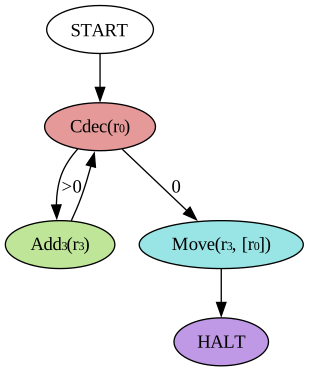
Now it is time to look at creating our first nested operation using this code framework! Let's start with the operation that was already mentioned above, which does . It's graph visualization looks like this for = :
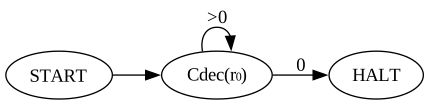
Its implementation is very simple: Execute Cdec(r) until r == 0, then HALT. Building the corresponding graph looks like this in code:
let mut graph = Graph::new();
let csub = graph.add_node(Order::Cdec { register });
let halt = graph.add_node(Order::Halt);
graph.add_edge(csub, csub, CoreEdgeType::CdecNonzero);
graph.add_edge(csub, halt, CoreEdgeType::CdecZero);
Using the edge types the Cdec node can be linked to two next nodes (itself on and the HALT node on ). This is perhaps the simplest non-trivial operation.
Here is another one that is more complicated which I called . This is a variadic operation taking one source register and any number of destination registers . I already showed this operation in the previous post, it adds the value in to to every destination register and then clears . This image shows :
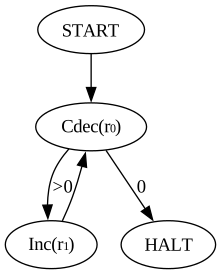
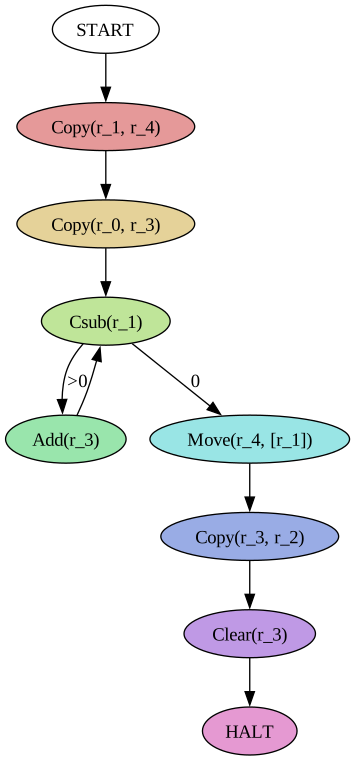
becomes interesting when we have more than one destination register, because then we can duplicate an existing value, which will become important to implement the operation! Suppose we want to overwrite the value in register with that in register , i.e. do exactly . This is different from since the latter clears the source register and adds its value onto the existing value in the destination register. But we can use the operation together with to realize , like so for :

A followed by two operations! It is interesting that this operation requires three registers for overwriting a single register. Here the register is only used to memorize the value of the source register so that we can later restore it, since drains the source register value. In my simulation engine, these temporary registers are called scratch registers and I defined all operations so that any scratch registers must start with a value of 0 and will end up with a value of 0 after the operation has completed. Since Minsky machines have an infinite number of registers, we can always find some unused register and use it as scratch space!
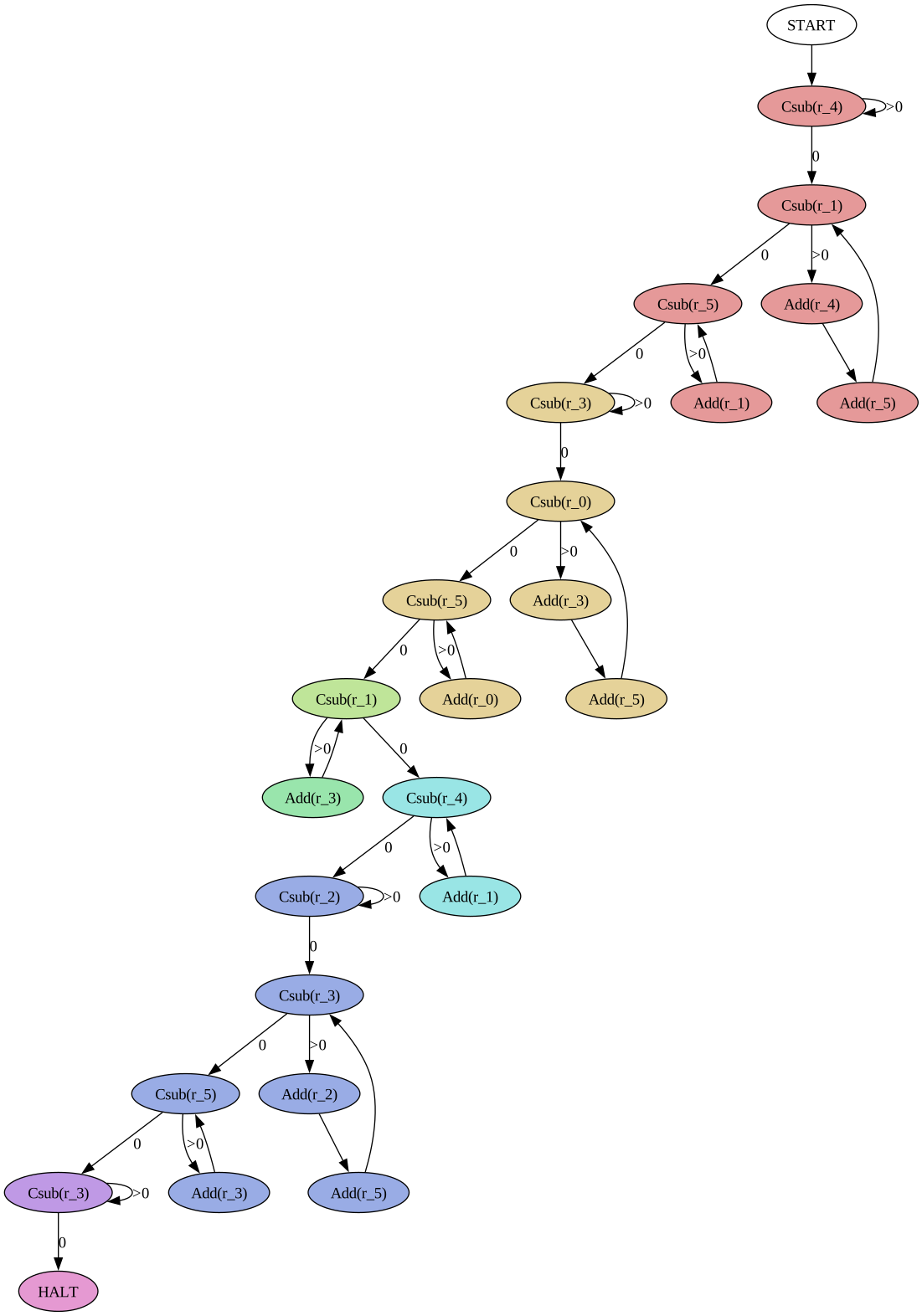
Now it is time for payoff, because we can flatten() the operation into a Minsky machine made up entirely of Inc and Cdec operations:
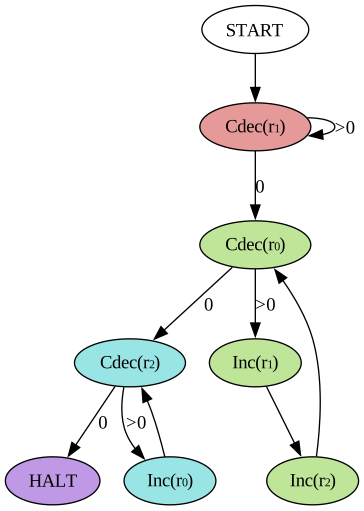
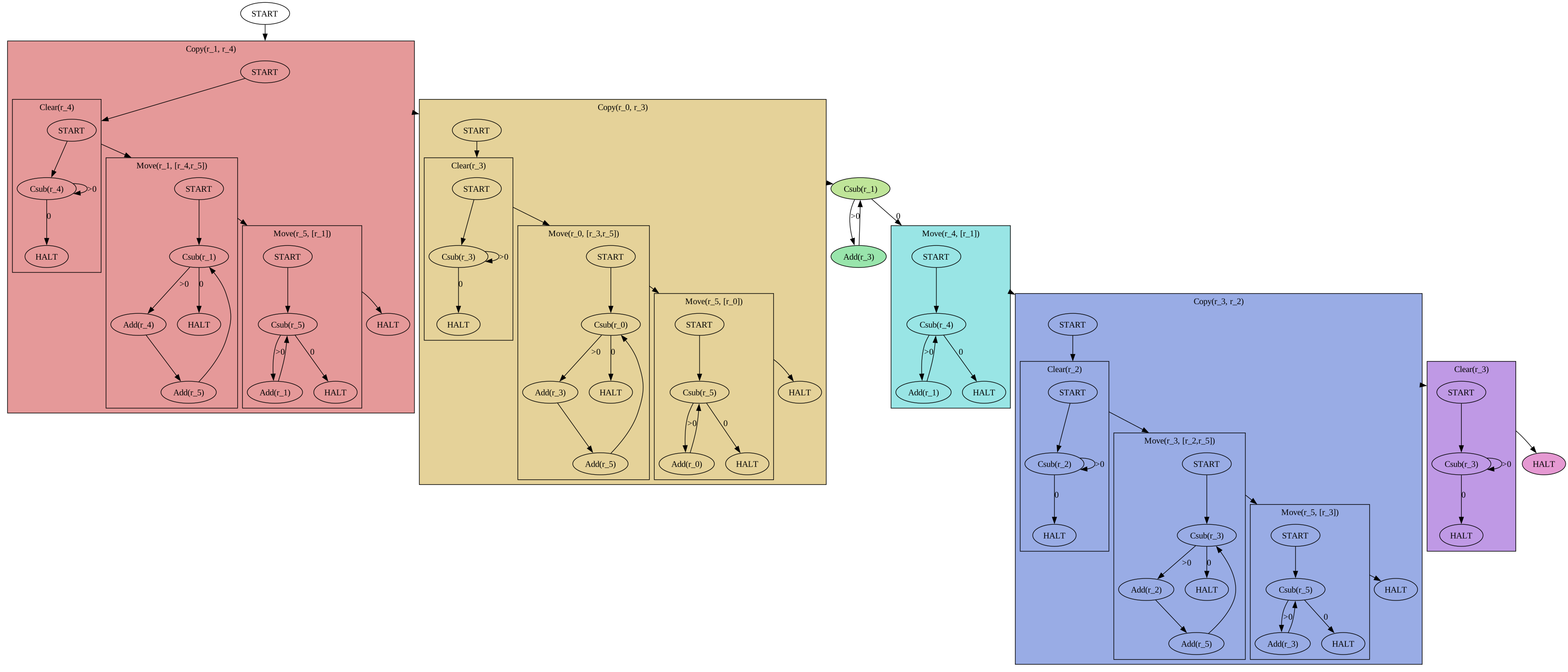
The colored nodes indicate which high-level operation each Inc and Cdec corresponds to! I also experimented with a nested visualization that shows both the high-level operations and their respective graphs, but I'm not happy with how cluttered this is. I'll still include these pictures in this post because they give a decent idea of how we get from the high-level graph to the final Minsky machine for each operation:
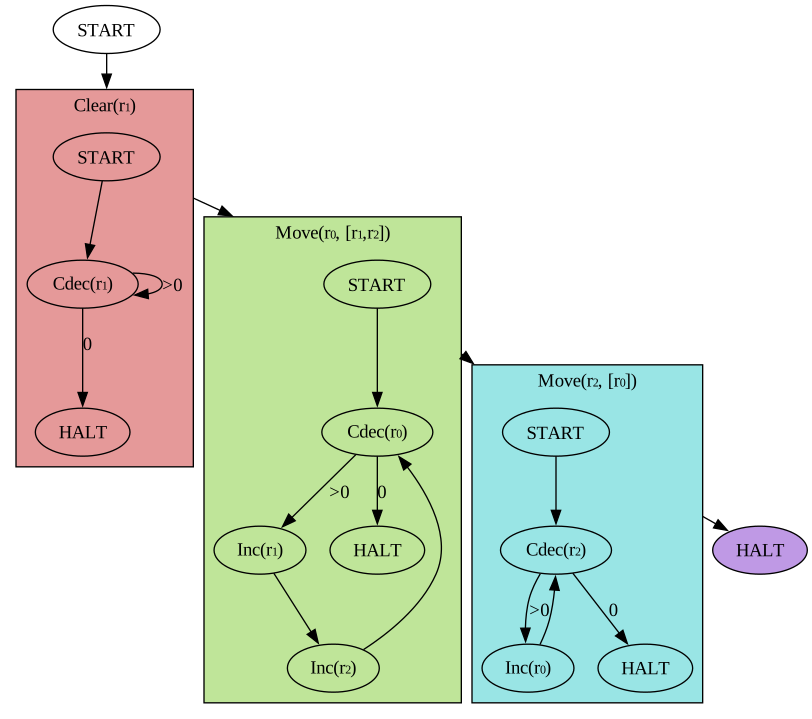
Graph replacement algorithms
The nested visualization illustrates a challenge that I stumbled upon while implementing the flatten() function: Each individual operation has its own HALT state, which we need to remove and instead link from it to the start node of the next operation. For , this is still somewhat simple:

First, link every HALT state of operation to the first state of operation where is an edge in the high-level graph. The new temporary edges are indicated with the red dashed arrows. Then, remove the HALT state and collapse the edges, keeping the edge type of the incoming edges of the HALT state (the green arrows). This is simple for operations that have no nested branching, but gets complicated if we introduce nested operations with multiple halting states into the mix. Enter :
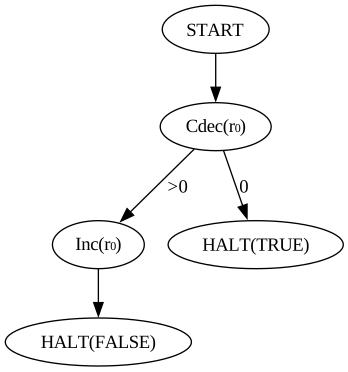
This operation has two HALT states, which breaks the previous algorithm! Suppose we want to implement an operation that calculates:
We can use for this like so:
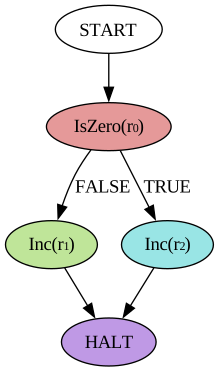

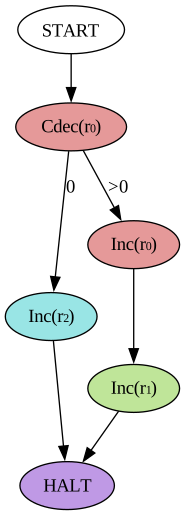
The first image shows the high-level implementation of , the middle image the revised graph replacement algorithm that matches halting nodes with their next nodes through named edges, and the last image shows the final Minsky machine. I implemented this through simple string matching, requiring custom named edges while building the graph:
let mut graph = Graph::new();

let is_zero = graph.add_node(IsZero::new(0).into());
let add1 = graph.add_node(Order::Inc { register: 1 }.into());
let add2 = graph.add_node(Order::Inc { register: 2 }.into());
let halt = graph.add_node(Order::Halt.into());

graph.add_edge(
    is_zero,
    add1,
    // Named edge:
    EdgeType::Custom(IsZero::HALT_STATE_FALSE.to_string()),
);
graph.add_edge(
    is_zero,
    add2,
    // Named edge:
    EdgeType::Custom(IsZero::HALT_STATE_TRUE.to_string()),
);
graph.add_edge(add1, halt, EdgeType::ALWAYS);
graph.add_edge(add2, halt, EdgeType::ALWAYS);
I'm not a fan of string identifiers for matching up stuff like this because mistakes can become hard to detect, but it works well enough for now.
All the operations
I'll conclude this long post by showing off the implementations of the various instructions needed for simulating a Turing machine. We already saw as well as the very useful , and . Here are the remaining ones, always in the order "high-level graph" -> "nested graph" -> "flattened graph":
for
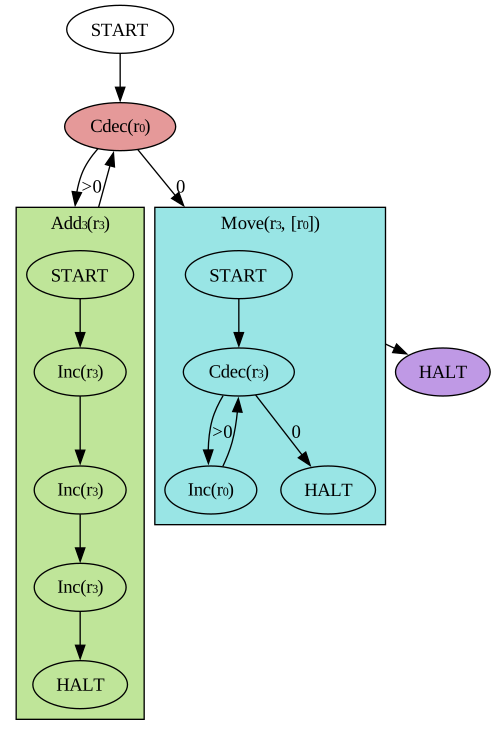
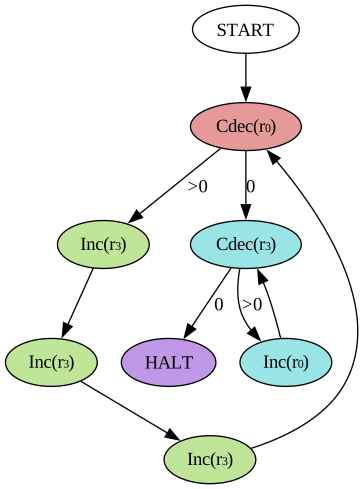
for
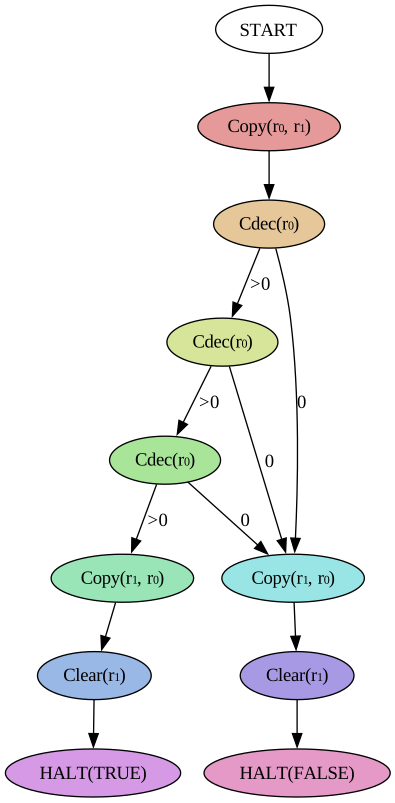
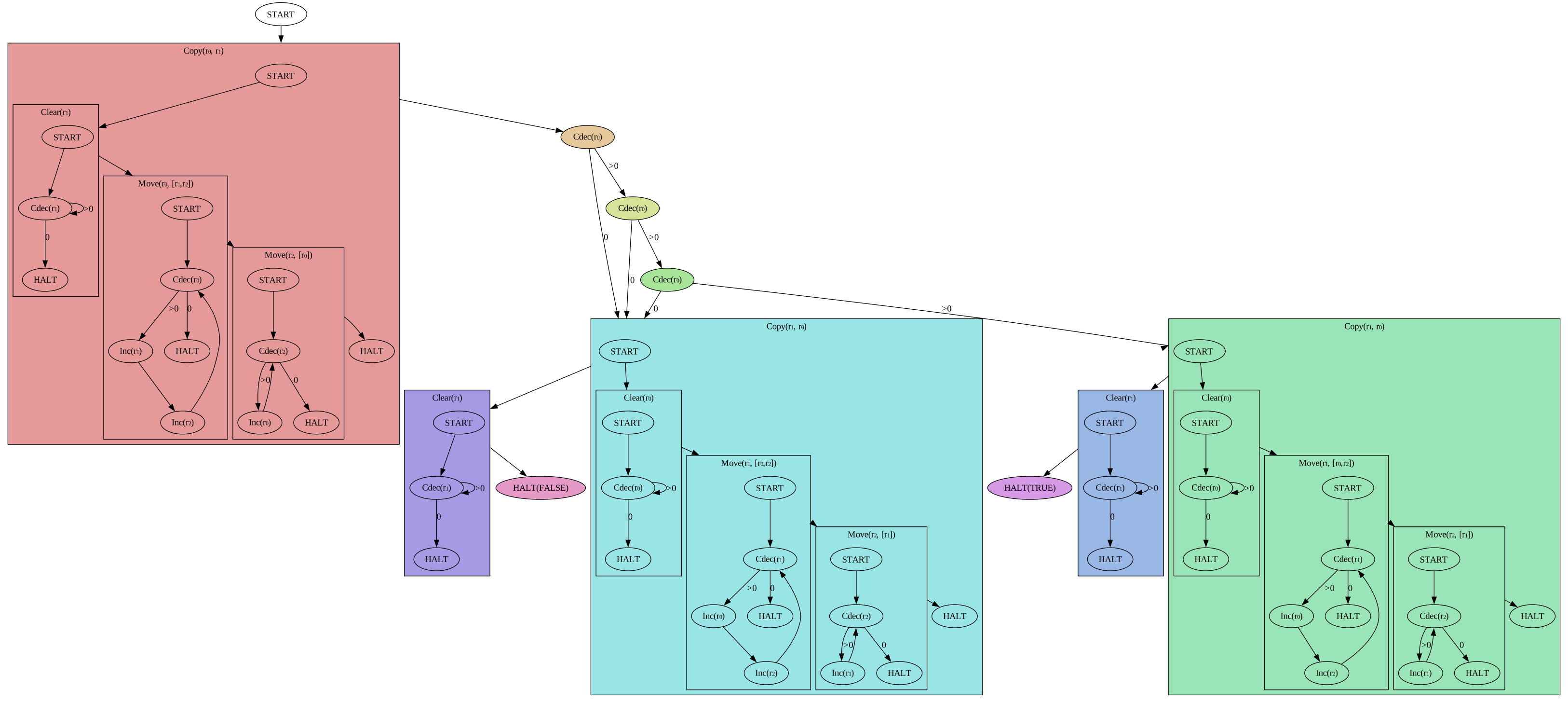
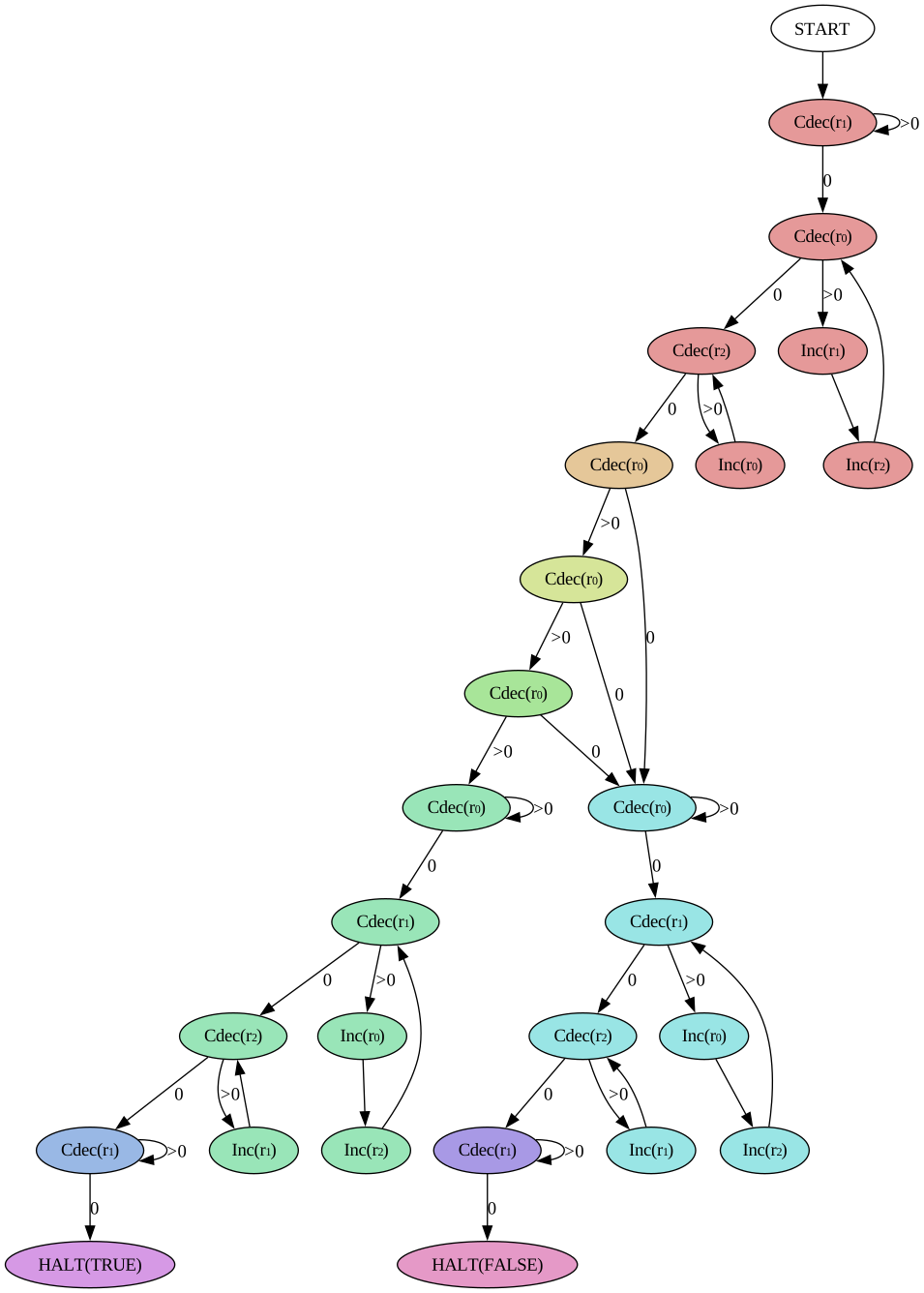
This is one of the more complex operations. The main issue is that the cleanup phase (restoring the value of and clearing the scratch register ) has to be duplicated since it happens after the actual decision and must result in two different halting states (TRUE and FALSE). Notice the identical high-level nodes that lead into HALT(TRUE) and HALT(FALSE)! A more simplified version could store a single true/false bit in another scratch register and then use a single operation to decide, I didn't implement that because that idea only came to me while writing this post :)
for
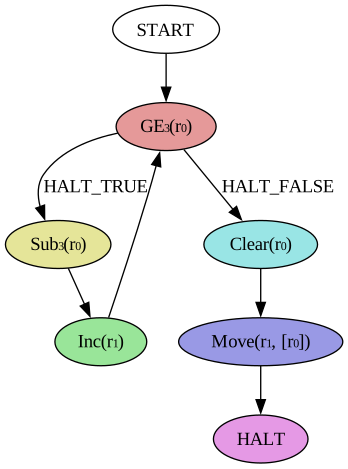
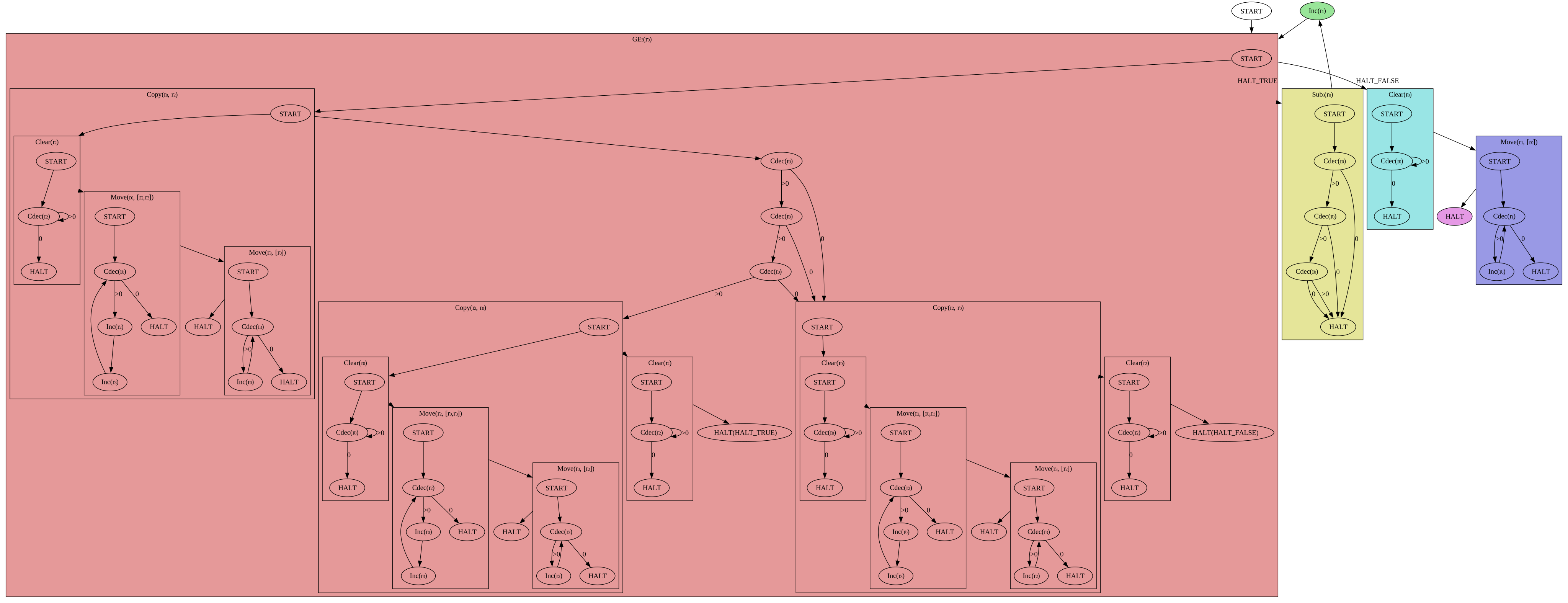
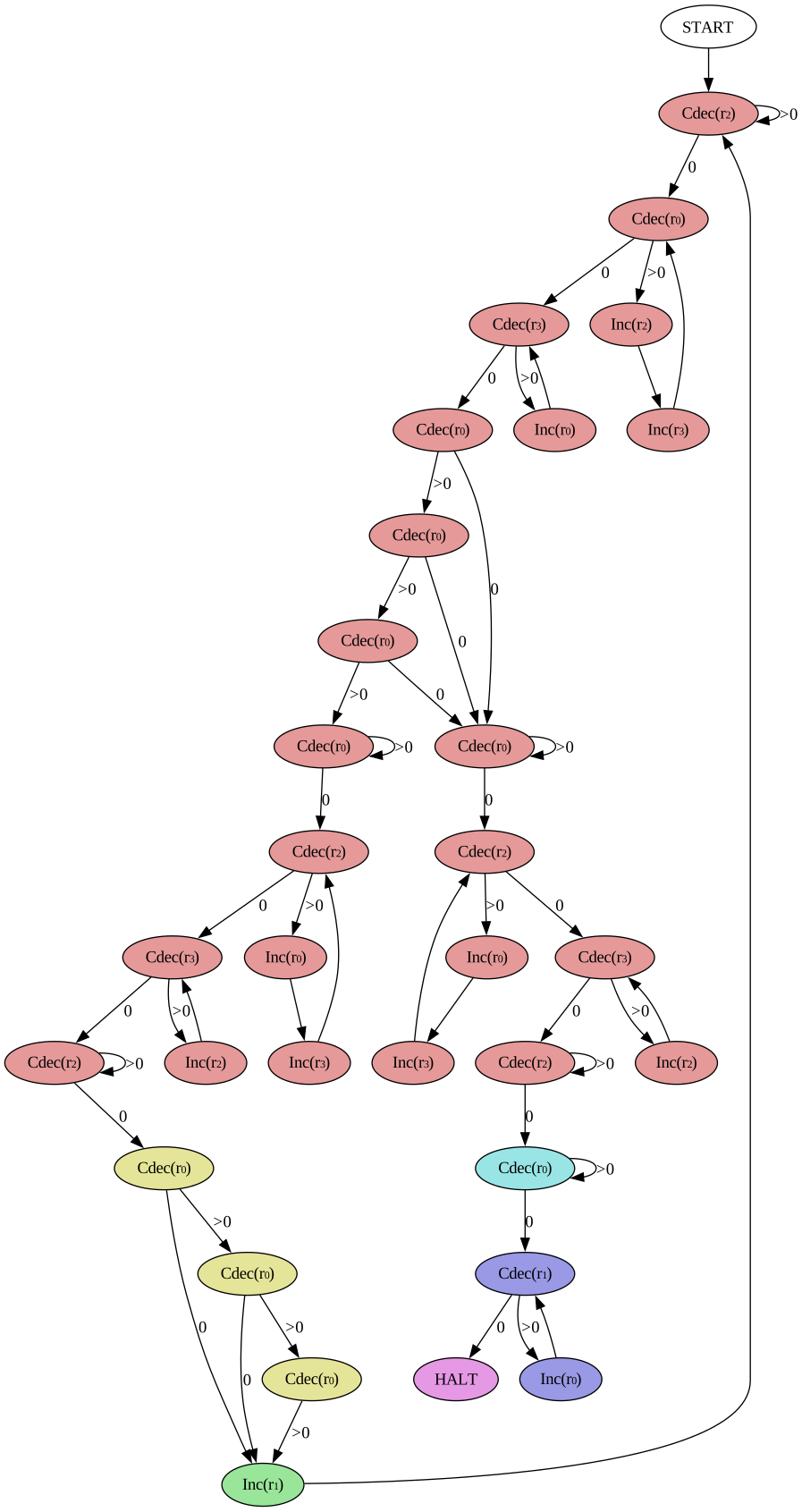
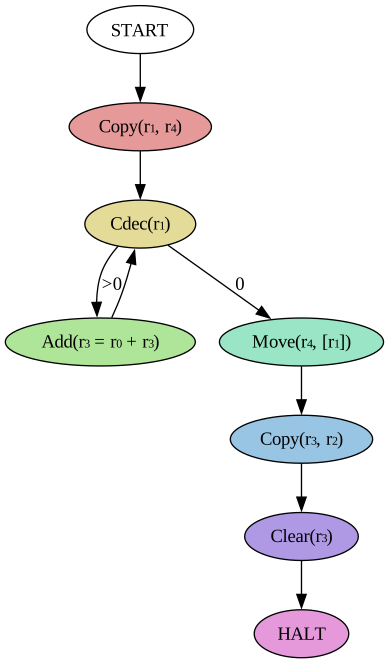
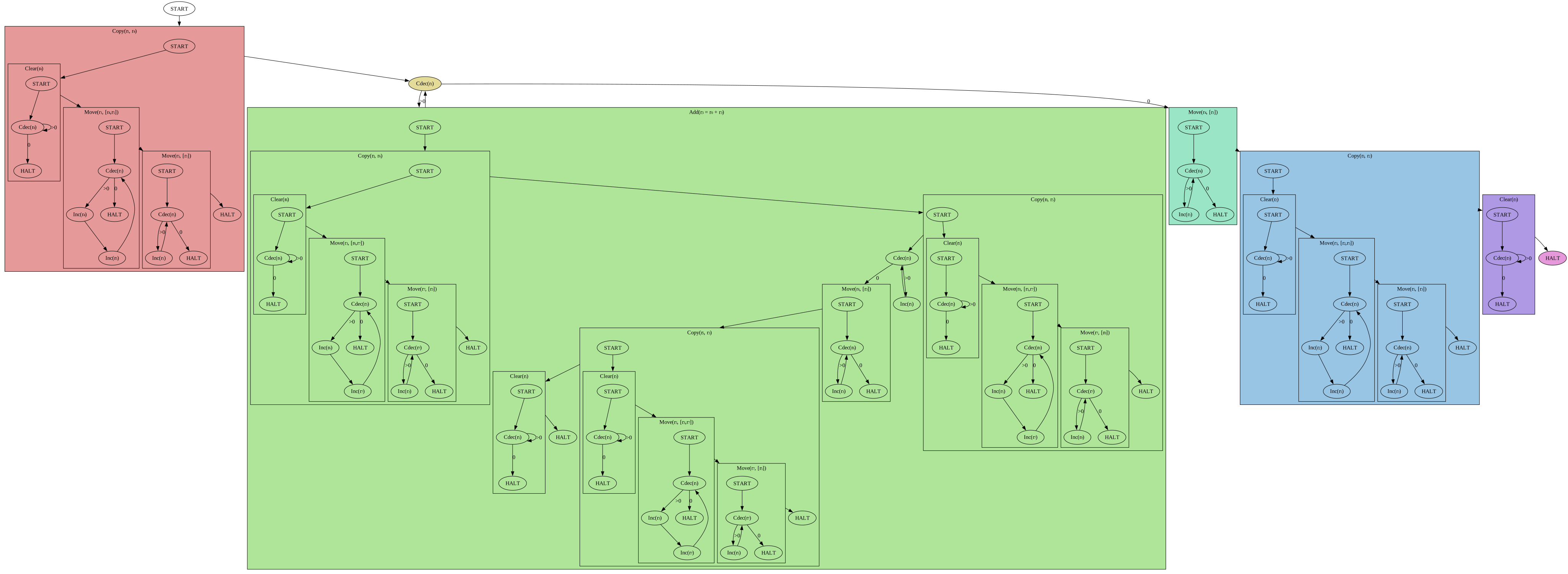
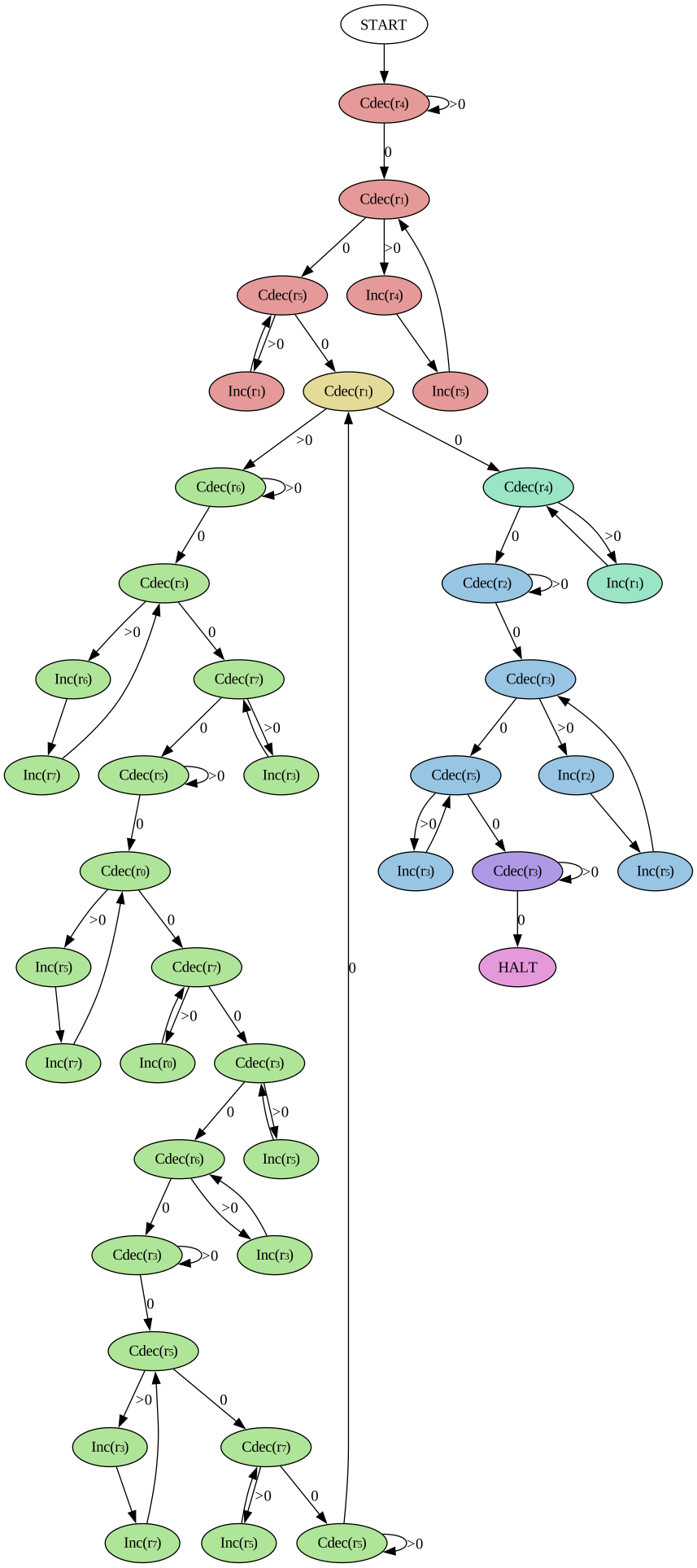
This one is interesting because it builds on using the identity ! It is implemented using a loop and therefore needs one more scratch register than (3 instead of 2). We can build all the functions of the Hyperoperation Sequence in this exact way, but every step in the hierarchy increases the number of scratch registers by one. Because register indices are hardcoded in Minsky machines, I believe this approach cannot compute on the Fast-growing hierarchy. It would be an interesting problem to figure out a way to compute on the Minsky machine :)
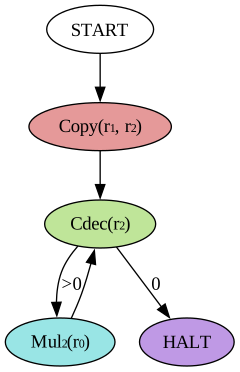
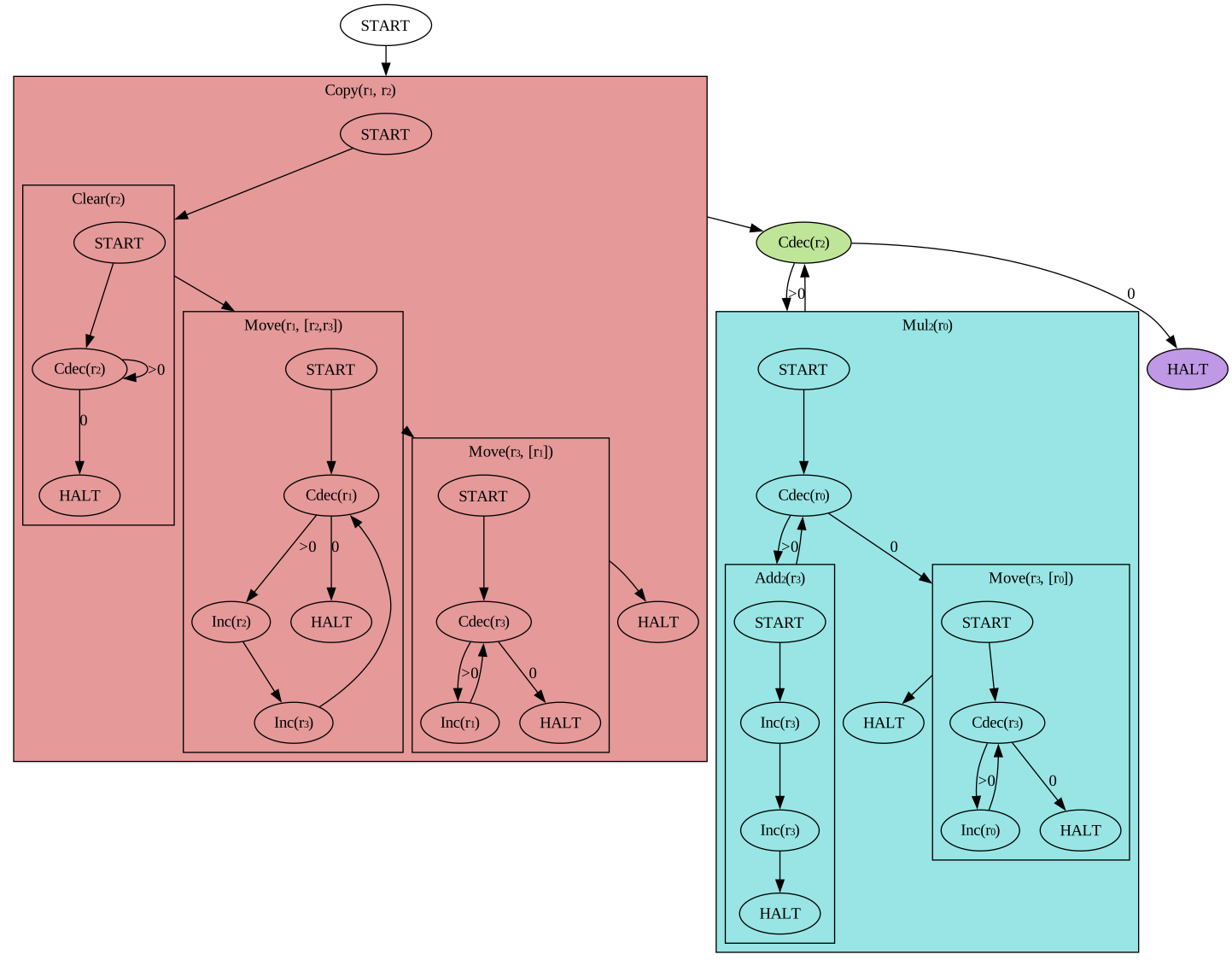
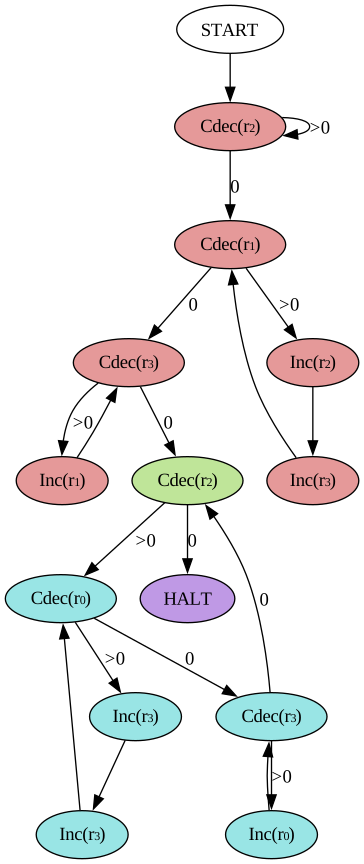
Even though this operation performs exponentiation, since the base is a constant the resulting graph is simpler than one might expect! We also don't need to worry about division since we explicitly shift to the left, which only multiplies.
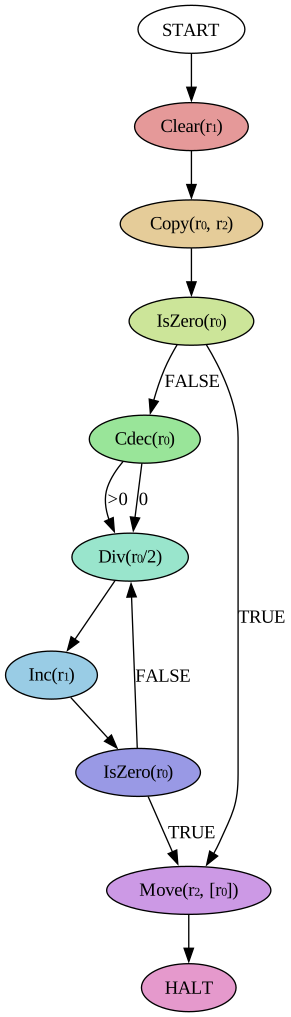
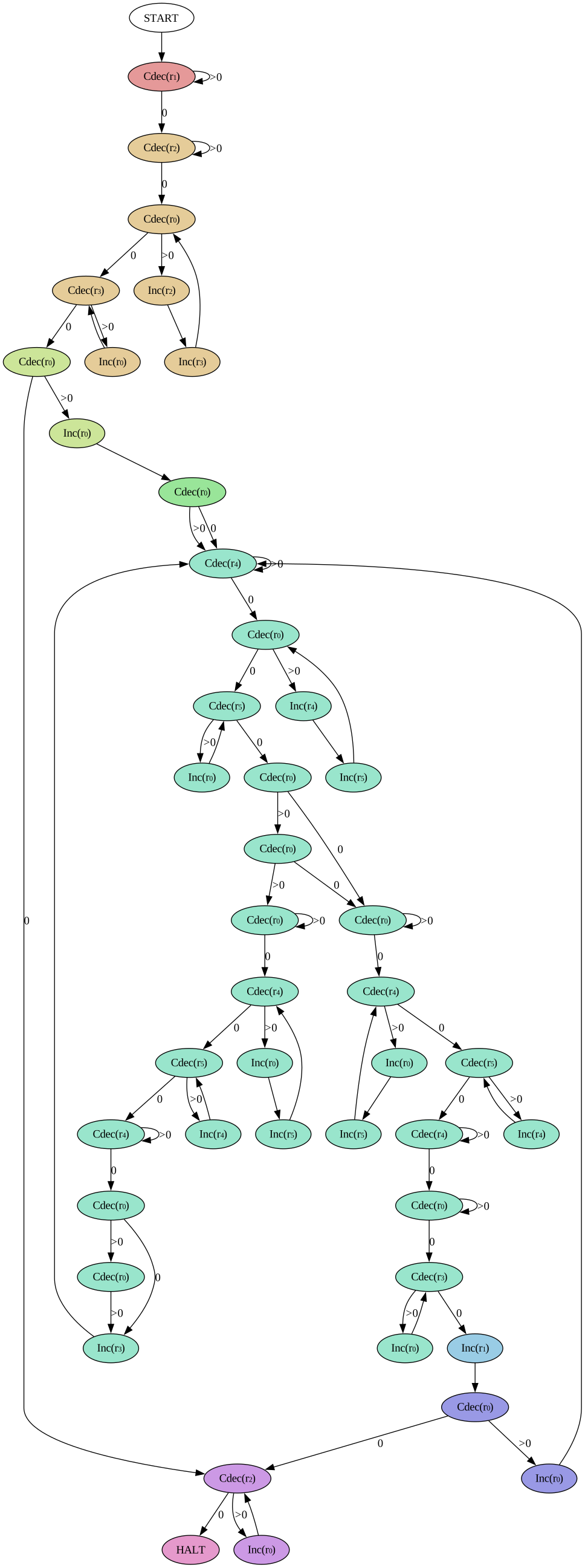
Here the operations start to get pretty big. also has some peculiarities, mainly because we don't have a good way of representing partial functions with the Minsky machine3. The biggest change to traditional logarithms is that I set to make it a total function (under ). I also implemented only but no because the former is what I needed for the tape simulation code.
Conclusion
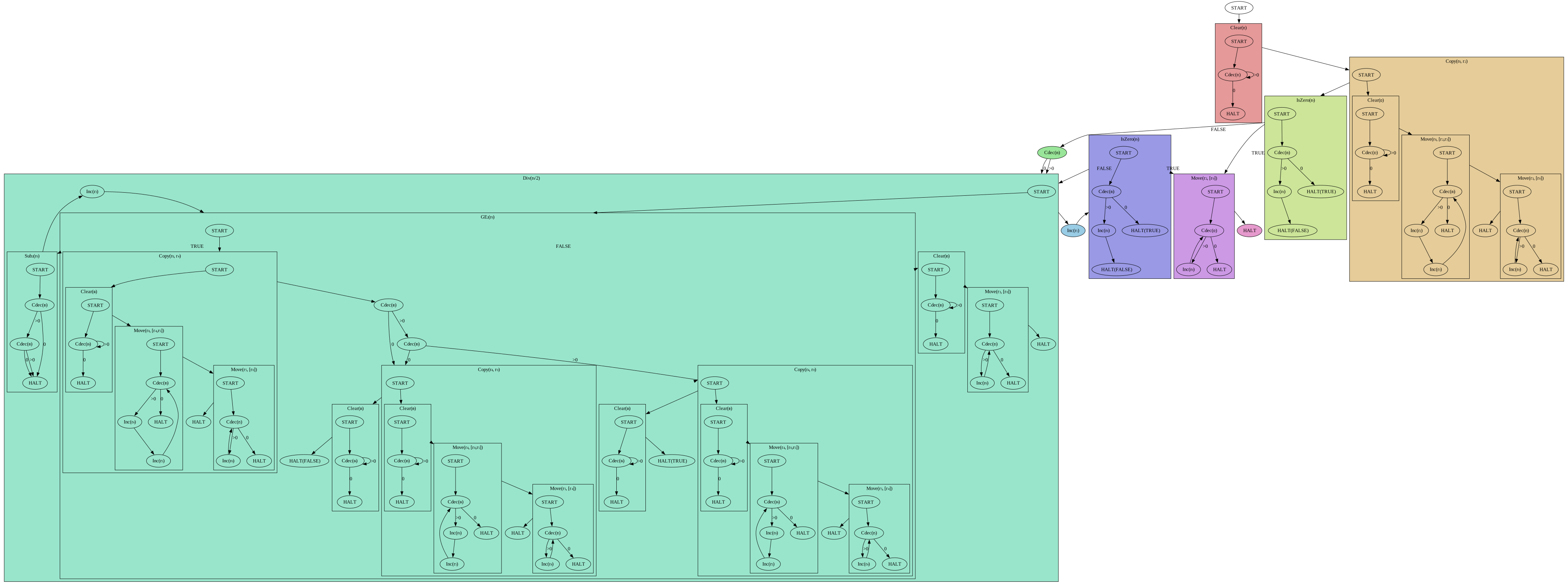
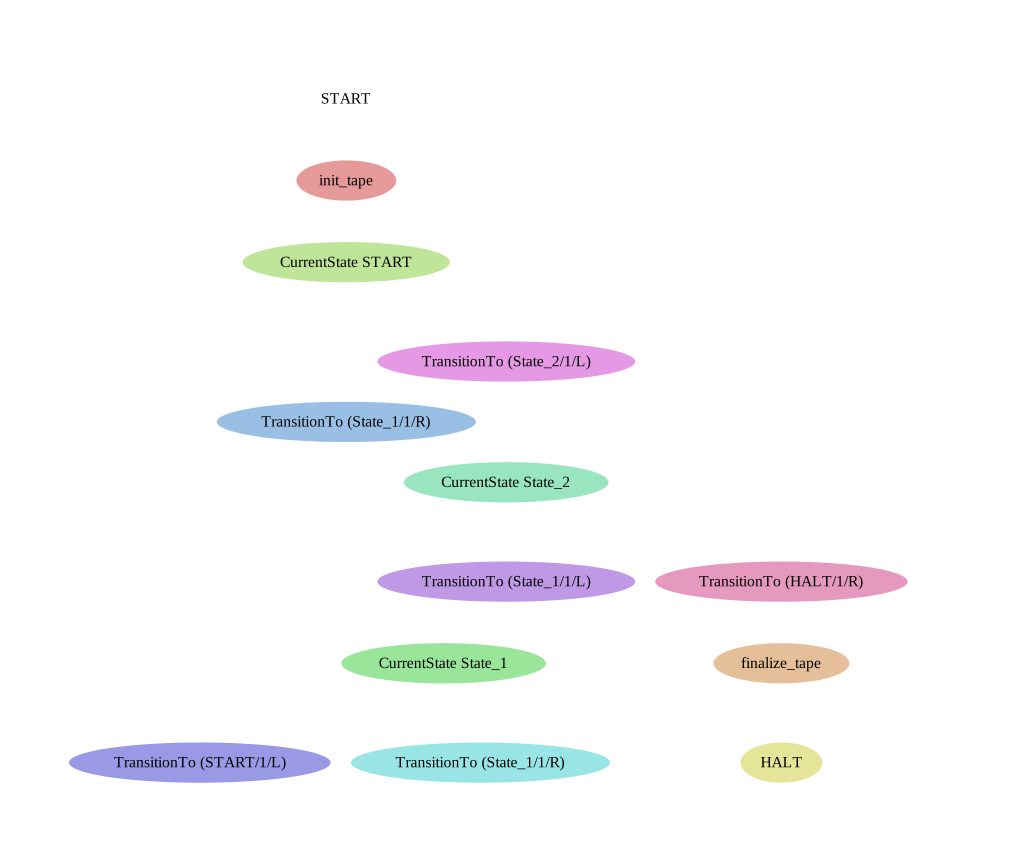
And there we have it, a bunch of mathematical operations built on the Minsky machine. I'm gonna leave today's post with a teaser for the final Turing machine simulation, showing only the high-level graph :)
Footnotes
-
Sad that I felt the need to point that out, but also a good indicator for how much programming has changed in the last two years. ↩
-
For incoming edges there can be more than one candidate per node, but this is not a problem, do you know why? :) ↩
-
We could enter an infinite loop, but that didn't seem like such a great idea because it is hard to detect. ↩